Todo
Refactor links to utilise RCM’s impl of extlink (path/to/document:heading) bc long relative links are a no-no
Todo
Update images, repo no longer called bteguide
Contributing to the Docs
Prerequisites
Familiarity with Markdown/reStructuredText.
-
Github is a web interface for collaboration using remote git repositories. The wiki is created in such a remote repository, and you’re looking at it right now! You will need an account to collaborate with the team. Create a Github account.
Setting up the environment
 How to Fork
After you have created a Github account click the Fork button in the top right of the BTE Docs Github repo. This will create a copy of the whole wiki project on your own Github account. You can work on this copy without affecting any of the main wiki.
How to Fork
After you have created a Github account click the Fork button in the top right of the BTE Docs Github repo. This will create a copy of the whole wiki project on your own Github account. You can work on this copy without affecting any of the main wiki.
Uploading your Content
Once you know what content you’re going to add, the next step is to find where is should go. Use the Navigator to do that.
When you find exactly where you want your content to go, click Add File and use Create new file or Upload files to upload it to your repo.
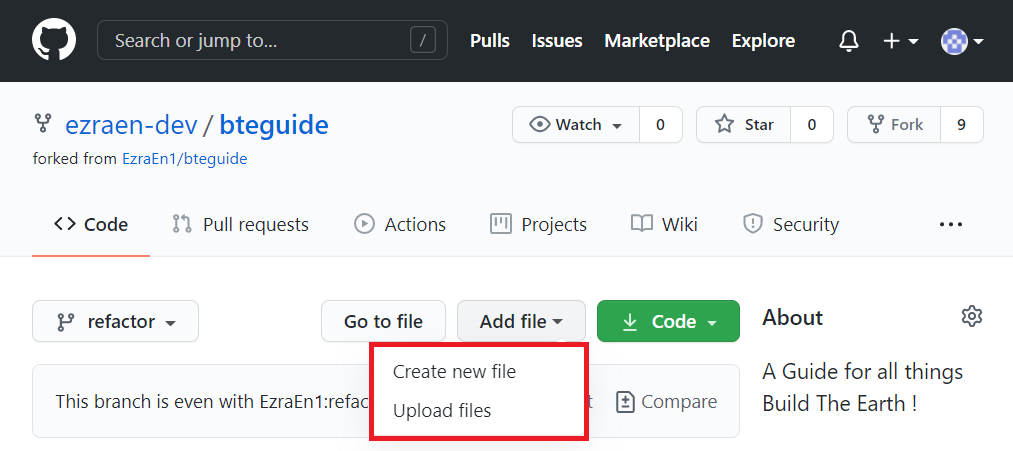 Adding Files
Writing Text
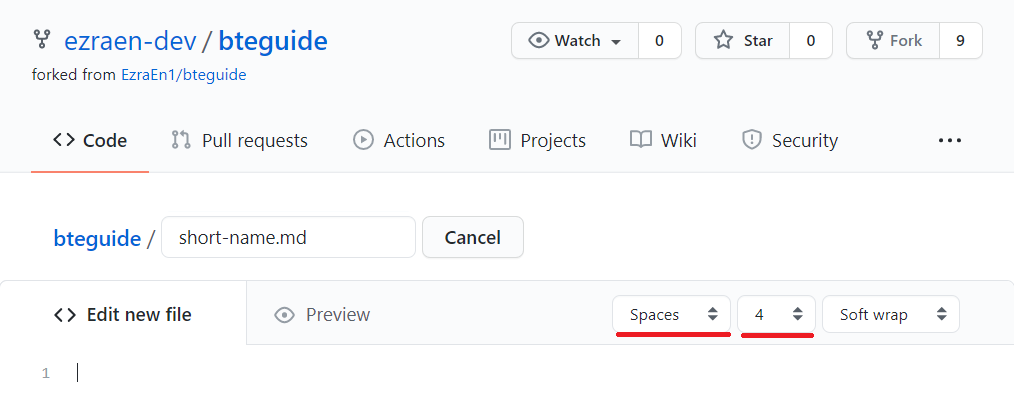 Text Editor
If you chose to Add File, you will find a rather minimalist Markdown Editor. Name your document with an appropriate dash-case short name, and by copying and following the Template Page, modify and write the documentation you intend to write.
Warning
The Github Markdown Editor does not save your progress like Google Docs. Should you wish to save your draft, either do so by keeping a local copy (by cloning the repo locally) or by storing your writing somewhere else.
Uploading Media
Todo
write this thing, because being able to upload pictures is pretty useful
Translating the Docs
For those who are familiar with how Sphinx handles internationalization, you will know that it is a terribly convoluted process for translators, requiring a whole build process and a great tolerance for .po files. No more.
Suggested Workflow
To begin work on a new language, simply create a new folder named after your target language’s 2-letter shortcode next to the /en/ directory. From there, copy and paste the entire contents of the /en/ folder and find the document you seek to translate, changing the metadata as explained below.
Additions to the Metadata
Building off of the Writing Text section, translation requires the use of a slightly different template page.
Unlike the regular template page, the template metadata is slightly different for many good reasons, most of all to help translators keep track of their translations across source material changes. All other metadata not explicitly declared here should not be modified from the source document for management’s sake.
Language Code lang:
This is your target language’s 2-letter shortcode following the standard set out in ISO 639-1.
Exceptions to this rule are:
Simplified Chinese:
zh-CNTraditional Chinese:
zh-TWShould there be any macrolanguages not accounted for, please open a GitHub issue accordingly.
Translation Version lang-version:
This is the version of your translation. Following the standards set out in the regular metadata format, this language-specific version operates independently of the source version value. When the source is updated, this version should be reset to 1.0.0 to reflect that the translation target has changed. Of course, already translated content need not reset accordingly.
Translator List translators:
Yes, translators get a chunk of the recognition pie too! Add your Github Handle to the list, and your alternate name if we know you by any other name, the format is exactly the same as the Author List
Shortcomings of the Workflow
The unfortunate result of trying to flatten and simplify both the document writing experience and the translation methodology means that short of modifying sphinx-intl or writing our own build tool, there is currently no elegant way to ensure that:
Translated documents are correctly linked to their source documents (via language switcher)
Untranslated document links are properly redirected/shown their updated source equivalents.
If you have any ideas as to how we can resolve these issues, contact EzraEn#4291 via the BTE Discord!